Esri ArcGIS: Install ArcGIS Pro Mobile Apps
ArcGIS Pro is a suite of geographical and spatial software tools from Esri that allow advanced functions and give access to a wide range of extensions for all types of projects. There are multiple ways to access Pro via mobile apps, explained in the instructions below.
- WARNING: If you select the option to take your ArcPro license offline and a reimage or other issue causes the original device to be lost, the license will become impossible to return and you will no longer be able to sign into ArcGIS. Please make sure if at all possible that you return your offline license before replacing a device. If this happens, please contact software@lsu.edu to resolve the issue.
To Install ArcGIS Pro Mobile Apps:
1. Please visit the app store for your iOS or Android device and install the app for the desired tool. Make sure the developer is Esri to avoid downloading malware.
2. Sign in by selecting the ArcGIS Enterprise option.
3. Enter lsu-its.maps.arcgis.com as the server URL.
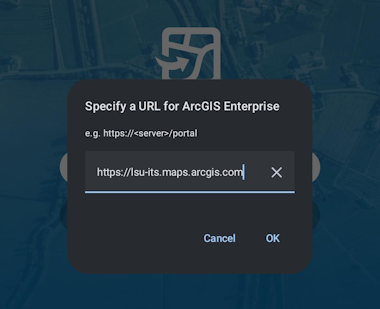
4. Click Sign in with myLSU ID to sign into ArcGIS Pro with your myLSU credentials, or click the ArcGIS Login dropdown if you use a separate account.
5. Access your online ArcGIS apps by repeating this process for each app you downloaded.
Referenced from: https://pro.arcgis.com
20722
10/7/2026 4:21:07 PM